نرم افزار UBitMenu | رایگان | 337 کیلوبایت | لینک مستقیم و رپیدشیر
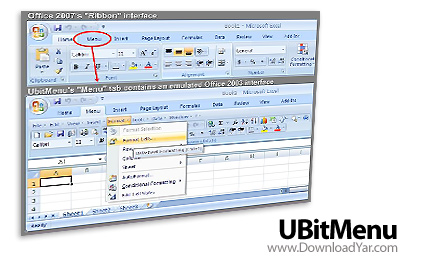
یکی از جذابیت های آفیس 2010 منوی ابزارهای آن بوده که به آن ribbon نیز گفته می شود . اما هستند کاربرانی که علاقه ای به این نوع استایل منو نداشته و کماکان علاقمند به منوی کلاسیک آفیس 2003 هستند. بنابراین این دست کاربران میتوانند با نصب برنامه UBitMenu منوهای آفیس 2003 را به آفیس 2010 اضافه نموده و در کنار تب های جاری Ribbon آفیس 2010 یک تب هم با نام Menu که حاوی کلیه منوهای کلاسیک آفیس 2003 می باشد، داشته باشند.
UBitMenu was designed to be a simple way for professional Microsoft Office users to get accustomed to the new ribbon based interface of Office 2007 without any performance loss. It will emulate / activate the Office 2003 menu in Word 2007, Excel 2007 and Powerpoint 2007.
If you have spent agonizing minutes trying to find features in Word, Excel or PowerPoint ribbons that would have been at your finger tips in Office 2003 you will soon appreciate UBitMenu, especially when you have to finish an important document under time pressure.
UBitMenu does not hide the ribbon interface, but adds the classic menu as a new ribbon. By-and-by you will realize that many functions are indeed easier to handle using Office 2007 ribbons. Microsoft has done a good job there.
UBitMenu can be installed with standard user rights on any Windows Office 2007 environment. You may need to save the file to a trusted location on your hard disk before you run the setup.
The setup application will install UBitMenu AddIn-files for Excel, Word and PowerPoint. All changes are registered for uninstallation. We have checked all setup files for viruses. Your scanner will recheck the files during installation.
To uninstall our software please use the 'Software' applet in the Windows Control Panel. The name of this applet may be language specific. You will find an entry for UBitMenu there.
Here are some key features of "UBitMenu":
- based on standard Microsoft Office-AddIn technology
- contains no active code elements (no virus scanner hassle)
- no VSTO or .NET-environment or configuration needed
- no dependencies
- extremely small file size
- no impact on performance
راهنمای دانلود :
- دانلود کلیه فایل ها کاملاً رایگان بوده و قیمت
های درج شده صرفاً به منظور آگاهی می باشد.
- پیشنهاد می شود برای دانلود فایل ها حتماً از
یک نرم افزار مدیریت دانلود و مخصوصاً FlashGet
استفاده کنید.
- فایل های کرک به دلیل ماهیت عملکرد در هنگام استفاده
ممکن است توسط آنتی ویروس ها به عنوان فایل خطرناک
شناسایی شوند در این گونه مواقع به صورت موقت آنتی
ویروس خود را غیر فعال کنید.
- چنانچه قادر به دانلود از سرور دانلود مستقیم
نیستید و در هنگام دانلود با پیغام خطای 403
روبرو می شوید، از لینک های کمکی استفاده کنید.
( لینک کمکی چیست؟ لینک کمکی، یک کپی مشابه از
فایل است که بر روی یک سایت دیگر جهت دانلود قرار
داده می شود و در مواقعی که یک سرور قادر به سرویس
دهی نباشد شما می توانید فایل مورد نظر خود را از
یک سرور دیگر دانلود نمائید)
- دانلود فایل ها از لینک کمکی به دلیل امکان حذف
سریع از روی سرور مربوطه، با مسئولیت خود کاربر می
باشد.
- فایل های قرار داده شده برای دانلود به منظور
کاهش حجم و دریافت سریعتر فشرده شده اند، برای خارج
سازی فایل ها از حالت فشرده از نرم افزار Winrar
و یا مشابه آن استفاده کنید.
- فایل های بسیار حجیم برای سهولت دریافت به چند
بخش تقسیم بندی شده اند. پس از دانلود تمامی بخش ها،
همگی را درون یک پوشه قرار داده و اقدام به بازگشایی
آنها از اولین فایل نمائید. با Extract نمودن فایل
قسمت اول، قسمت های بعدی به صورت خودکار شناخته می
شوند و یک به یک از حالت فشرده خارج شده و در نهایت
فایل کامل را تشکیل می دهند.
- کلمه رمز جهت بازگشایی فایل فشرده عبارت www.downloadyar.com
می باشد. تمامی حروف را میبایستی به صورت کوچک تایپ
کنید و در هنگام تایپ به وضعیت EN/FA کیبورد خود توجه
داشته باشید همچنین بهتر است کلمه رمز را تایپ کنید
و از Copy-Paste آن بپرهیزید.
- چنانچه در هنگام خارج سازی فایل از حالت فشرده
با پیغام CRC مواجه شدید، در صورتی که کلمه
رمز را درست وارد کرده باشید. فایل به صورت خراب دانلود
شده است و می بایستی مجدداً آن را دانلود کنید. در
فایل های بسیار حجیم که به چند بخش تقسیم شده اند
دقت کنید در هنگام بازگشایی بر روی کدام یک از قسمت
ها پیغام خطای CRC داده می شود سپس برای دانلود مجدد
فقط همان قسمتی که خراب دانلود شده است را دانلود
نمائید.
- فایل هایی که پس از خارج شدن از حالت فشرده به
فرمت iso. هستند می بایستی ابتدا با استفاده از نرم
افزار Nero و یا UltraIso بر روی سی
رایت شوند و سپس مورد استفاده قرار گیرند.
رمز فایل: www.downloadyar.com
دانلود, دانلود رایگان, دانلود لینک مستقیم, دانلود رایگان مستقیم, داونلود, دانلد, nhkg,n , دانلود نرم افزار, دانلود microsoft office menu, دانلود change office menu, دانلود swap office ribbon, دانلود change, دانلود changer, دانلود modify, دانلود تبدیل منو, دانلود تبدیل منوهای آفیس, دانلود آفیس, دانلود مایکروسافت, دانلود منو


0 نظر