
دانلود FoxPlayer v2.3.0 - نرم افزار پلیر موسیقی
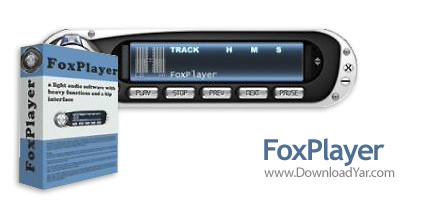
نرم افزار FoxPlayer v2.3.0 | شماره سریال | 3.7 مگابایت | لینک مستقیم و رپیدشیر
شما برای اینکه بتوانید یک موسیقی را در کامپیوتر خود گوش دهید باید از نرم افزاری برای پخش و اجرای آن استفاده کنید. نرم افزار FoxPlayer محصولی از شرکت Foxmediatools بوده که شما به آسانی با استفاده از آن میتوانید در کامپیوتر خود آهنگ گوش کنید. این نرم افزار از فرمت های FLAC, AAC, MP4, WMA و ... پشتیبانی می کند و قادر به پخش آنها می باشد. همچنین این برنامه دارای محیط بسیار زیبایی به منظور پخش موزیک می باشد و نیز امکانات متفاوتی را در هنگام پخش در اختیار شما قرار می دهد. مزیت بسیار خوب این پلیر قابلیت تغییر ابعاد آن و تبدیل شدن به یک پلیر بسیار کوچک است که موجب جذابیت هر چه بیشتر آن در میان کاربران شده است.
قابلیت های کلیدی نرم افزار FoxPlayer v2.3.0:
- قابلیت اجرا و پخش موزیک در کامپیوتر.
- پشتیبانی از انواع فرمت های صوتی.
- داشتن محیط زیبا و امکانات متفاوت.
- داشتن ابعاد و اندازه کوچک.
- سازگار با ويندوز هاي مختلف.
- و ...
The program lacks in size and compensates in performance having an integrated ID3 editor which simplifies renaming and modifying files and using Xaudio MPEG engine to power its impressive number of options.
FoxPlayer is bound to make you love it at first sight: even before checking out any of its features. It has a chic small main window which in spite of the many buttons it has, keeps a nice, “ventilated” look.
Its vivid but not striking appearance is an inspired combination of ambient-suited colours and let’s not forget about the skins available.
Since the (very discreet) equalizer is fused to the FoxPlayer's main window you have quick access to the frequency settings whenever you like.
You can maximize the playlist according to your needs and the amount of information available will satisfy even the most exigent music fan – the info columns let you arrange content using criteria like title, artist, album, year, track number, genre or length.
You can directly manage all the info for the tracks due to the integrated ID3 tag-editor: by right-clicking on the required field you can type in your info and then click everywhere else to save data.
The main window allows you to switch the time counter-modes (elapsed time and remaining time) with a simple click. You also have the playlist-track number displayed clearly together with the scrolling titles. Above the repeat-type mode indicator there’s the bit rate and sample rate location and all the functions just fall into the right place.
Functional
FoxPlayer is a very light, fast and versatile music player which is also able to convert your mp3s into wavs with great efficiency.
With a proper configuration, FoxPlayer will play FLAC, AAC, MP4, WMA and other formats.
Naturally, such a program could not have come without, full drag and drop functions, Ctrl click, click Shift click selection and simple Del usage.
Besides the tones of options you are presented with when using this application, there are those simple but all the more important functions available such as minimize-to-tray, always on top, exit after play, allow multiple instances and many more you will enjoy discovering yourself.

0 نظر